

The TDAC form has two main sections: personal information and travel details. Each field corresponds directly to your passport data or booking confirmation. The form takes 2–5 minutes to complete and requires no account or payment.
TDAC Form Structure
Section 1: Personal Info
Passport details, nationality, date of birth, email address
Section 2: Travel Details
Flight number, arrival date, departure country, accommodation
Section 1: Personal Information Fields
The form is divided into two sub-sections on this tab: Personal Information In Passport (from your passport) and Personal Information (additional details).
Family Name and First Name
Enter exactly as printed on your passport data page. Family Name = your surname. First Name = your given name(s). Middle Name is optional – enter "–" if the field requires input but you have no middle name. Capital letters A–Z only – no accents, special characters, or spaces within a name part.

Passport Number
Enter the full passport number including any letter prefix. This is the most critical field – any mismatch will cause immigration issues. Do not add spaces or hyphens.

| Country | Example Format | Notes |
|---|---|---|
| United Kingdom | 123456789 | 9 digits |
| United States | A12345678 | Letter + 8 digits |
| Australia | PA1234567 | 2 letters + 7 digits |
| Germany | C12345678 | Letter + 8 digits |
| India | A1234567 | Letter + 7 digits |
Nationality / Citizenship
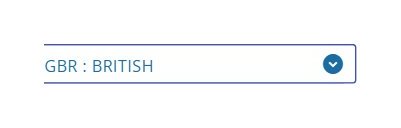
Type your ISO country code (e.g., GBR, USA, DEU) or country name in the search field, then select from the dropdown. This is the country that issued your passport – which may differ from your country of residence. If you hold dual citizenship, use the passport you will travel on.
Date of Birth
Select your birth date using the three linked dropdowns: Year → Month → Day. The Month dropdown only activates after you select the Year, and the Day dropdown only activates after Month is selected. Enter your birth date exactly as in your passport.

Passport Expiry Date
Enter in DD/MM/YYYY format, exactly as printed. Thailand requires passports valid for at least 6 months beyond your entry date. Renew before travel if needed.
Email Address
Enter an active email you can access during travel. Your TDAC QR code confirmation is sent here. Take a screenshot immediately after submitting as backup – even before checking your email.
Section 2: Travel Information Fields
Flight Number – The Most Common Error
Enter the airline IATA code followed directly by the flight number, with NO spaces.
✅ Correct Format
- TG502
- BA9
- EK373
- QR831
- SQ317
❌ Will Cause Errors
- TG 502
- BA 09
- EK 373
- QR 831
- SQ 317
Find your exact flight number on your booking confirmation email, e-ticket, or the airline's app.
Arrival Date
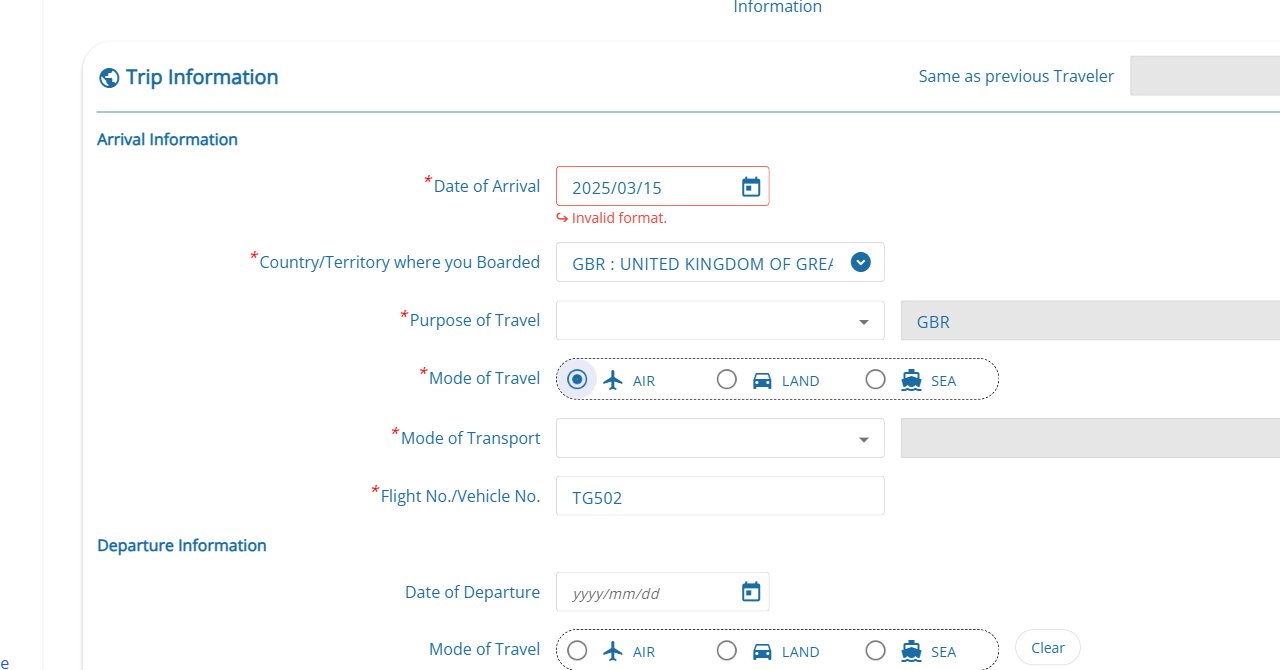
Enter the date you will enter Thai territory. For overnight flights that cross midnight, enter the day you actually land in Thailand (not the day you depart). Use the calendar icon to select the date — the form accepts the format yyyy/mm/dd.
Country of Departure
The country you are traveling from, not your home country. Example: UK citizen living in Germany flying from Frankfurt → select Germany.
Arrival Airport or Port
| Airport | IATA Code | Location |
|---|---|---|
| Suvarnabhumi | BKK | Bangkok (main international) |
| Don Mueang | DMK | Bangkok (budget/regional) |
| Phuket International | HKT | Phuket |
| Chiang Mai International | CNX | Chiang Mai |
| Koh Samui (Bangkok Airways) | USM | Koh Samui |
| Hat Yai International | HDY | Hat Yai / Southern Thailand |
Purpose of Visit
Select: Tourism (holiday/vacation), Business (meetings, conferences), Transit (passing through), or Other (medical, visiting family, education).
Duration of Stay
Enter your estimated number of days in Thailand. Approximate is fine. Common entries: 7–14 days (short vacation), 30 days (visa exemption maximum), 60 days (tourist visa), 90+ days (long-stay visa).
Accommodation Address – Complete Guide
Enter the full name and street address of your first accommodation in Thailand. Use your booking confirmation or Google Maps for the exact address.
| Accommodation Type | What to Enter |
|---|---|
| Hotel or guesthouse | Hotel name + full street address, city, postcode |
| Airbnb or vacation rental | Property address from listing/booking confirmation |
| Staying with friends or family | Their complete Thai address (ask them) |
| Cruise ship | Ship name + first Thai port (e.g., "Laem Chabang Port, Chonburi") |
| Living aboard yacht | Marina name + full address |
If you don't have accommodation confirmed yet, enter the first hotel you're considering. Minor address inaccuracies are not strictly enforced at immigration.
TDAC Form Validation Rules
| Field | Validation | Common Mistake |
|---|---|---|
| Passport number | Specific character count/format | Spaces or wrong length |
| Valid email format required | Typo in domain (@gmail.co) | |
| Flight number | No spaces allowed | "TG 502" fails → use "TG502" |
| Dates | DD/MM/YYYY format only | US-style MM/DD/YYYY |
| Arrival date | Must be within 72 hrs of submission | Submitting too early |
No Document Uploads Required
The TDAC form does not require you to upload:
- Passport photos or scans
- Visa documents or approvals
- Hotel booking confirmations
- Flight tickets or boarding passes
- Travel insurance certificates
All information is entered as text only. This is one way to identify scam sites – legitimate TDAC does not ask for document uploads.
Can I Edit TDAC After Submitting?
Once submitted, the TDAC cannot be edited through the website. If you discover an error:
- Minor errors (hotel address typo, approximate stay): generally not problematic
- Passport number error: contact Thai Immigration Bureau before travel
- Wrong arrival date or flight: submit a new TDAC with correct information – multiple submissions are acceptable